
Building a Smart Form Validation Workflow with AI and Make.com
Building a Smart Form Validation Workflow with AI and Make.com
Last year a client flagged that they’d been getting spam submissions via one of their web forms, highlighting a need for better form validation. The problem was that when the form is submitted it does a lookup in Zoho CRM, finds matching member accounts and sends emails based on the submitted data. Any spam that made it through was then passed directly on to their members.
They’d updated the reCAPTCHA and enabled email verification in Zoho Forms, which helped. But when verification emails failed to send through AWS SES (which happened occasionally) there was no way to tell if the submission was legitimate or spam. The data didn’t exist until verification was complete.
I was asked to investigate if it were possible to see submissions before verification. However, when email verification is enabled, Zoho Forms doesn’t store unverified submissions to comply with GDPR data protection principles. It wasn’t possible.
I worked with ChatGPT to evaluate other solutions within their architecture. One of those was a suggestion to use an AI agent in Make.com. However, as this was a few months before I’d started work on Visa Scope AI, I didn’t want to oversell a workflow that might not work, so I provided the solution but advised the client on a wait and see approach.
In autumn I attended a Make.com AI workflow session and I wanted to test out the AI agents in MAke.com workflows. This felt like exactly the right idea to try out.
The first step was to draw out and design the workflow. The concept was to submit the form data to Make.com, analyse it with an AI agent, the agent would then determine if the submission was valid, a test, spam or flagged for admins to review. I spent time considering what was needed and what the best outcome would be, especially for the spam entries.
I also decided to build in testing to the workflow. Currently if an admin wants a test submission then it will trigger an email to all matching members. We could go further in future and update the CRM workflows to trigger the data to be sent to test users but I felt this was outside the scope of the MVP I wanted to validate.
Before I go into detail about the outcome, let me talk you through the build.
Once the workflow was designed I wanted to build a working demo for the client. I couldn’t use their Zoho instance or website, so I needed to replicate their environment using infrastructure I had available.
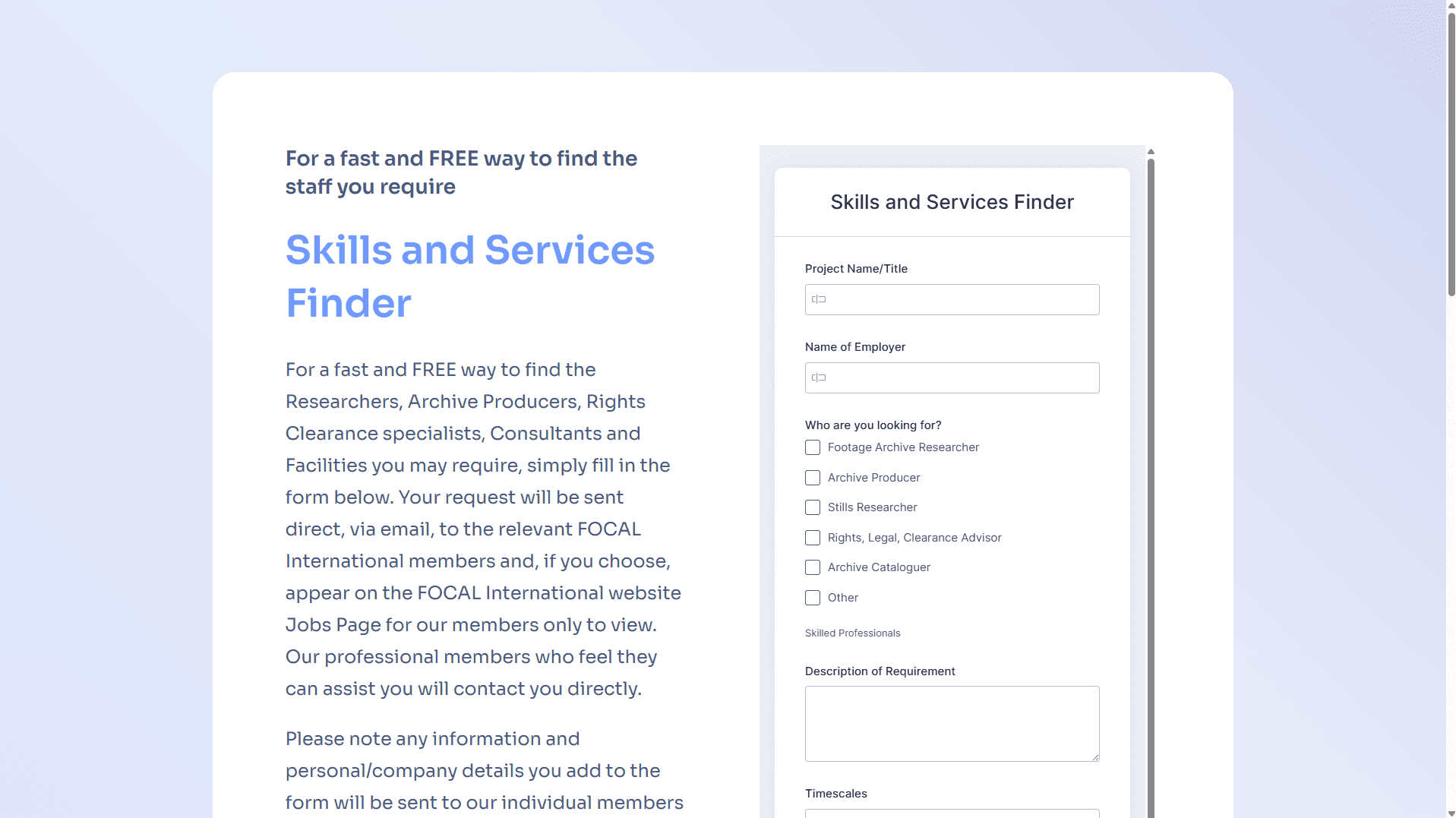
I started by creating a one-page Carrd website. I’d purchased a subscription through the Visa Scope AI project so adding a new page was free. I hosted it on a Product Scope subdomain and chose a basic template which I could adapt to match the client’s branding.
I then found the form I’d built back in 2020 and replicated it in a free Zoho Forms package. Zoho Forms allows iframe embedding, so I built this into the Carrd page and updated it with copy from the client website. As a PM I’ve found it’s better to demonstrate to non-technical users as much as you can—they find workflows and charts helpful but they can’t fully visualise them. Showing is more valuable than describing.
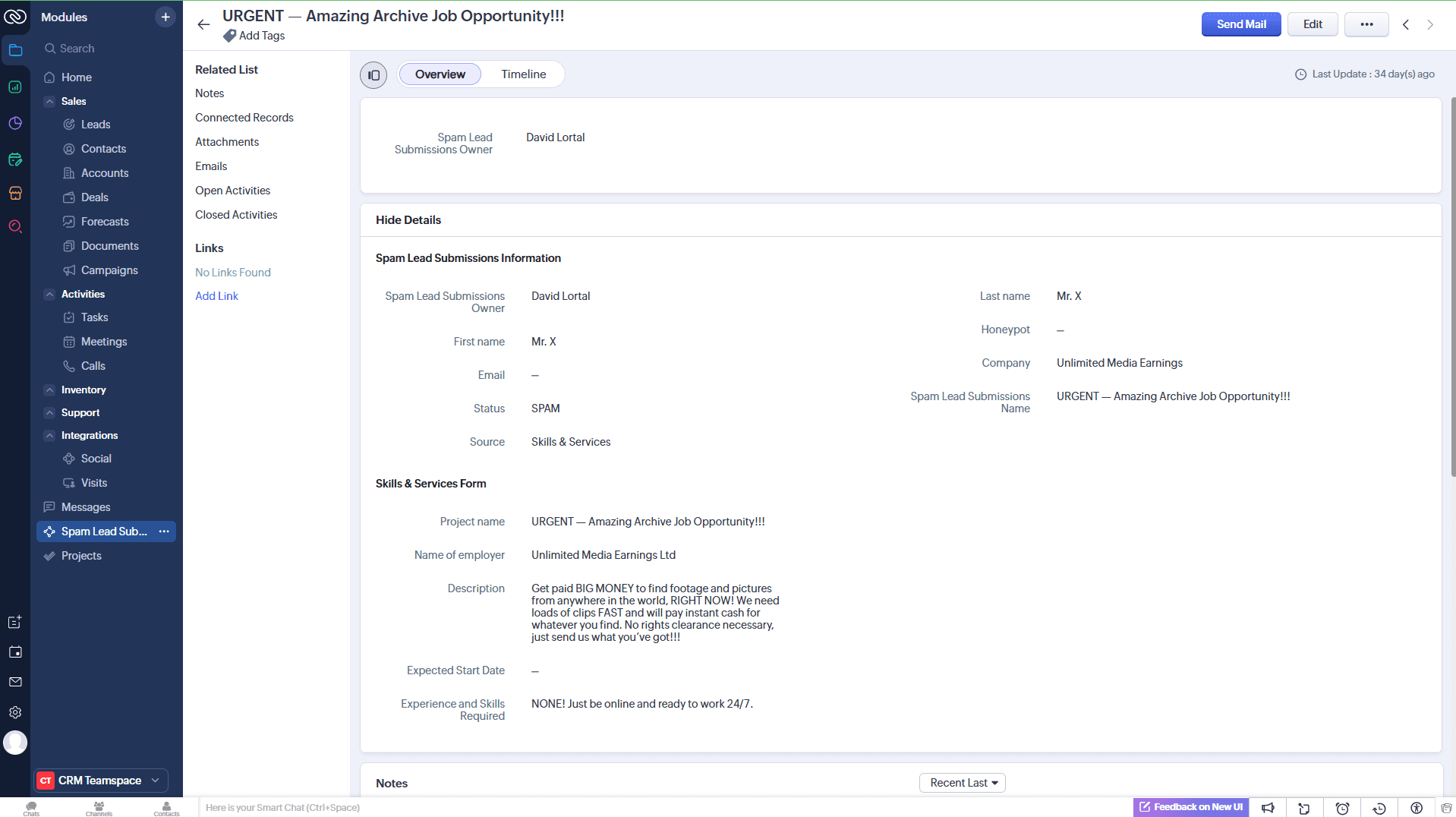
The next task was configuring Zoho CRM. In the client’s workflow submitted forms create leads so I mapped the fields to the lead module to match their setup. Valid submissions would work exactly as they do in production. Test submissions would also create leads but I could tag them via Make.com to prevent the triggers firing.
I decided to create a completely new module for spam entries. This reduced risk as the result was that there was no chance spam would reach members. The client could review submissions and manually convert anything flagged for review to leads if needed. The separation also meant spam could be deleted quickly without affecting the main CRM. Complete compartmentalisation of the workflow.
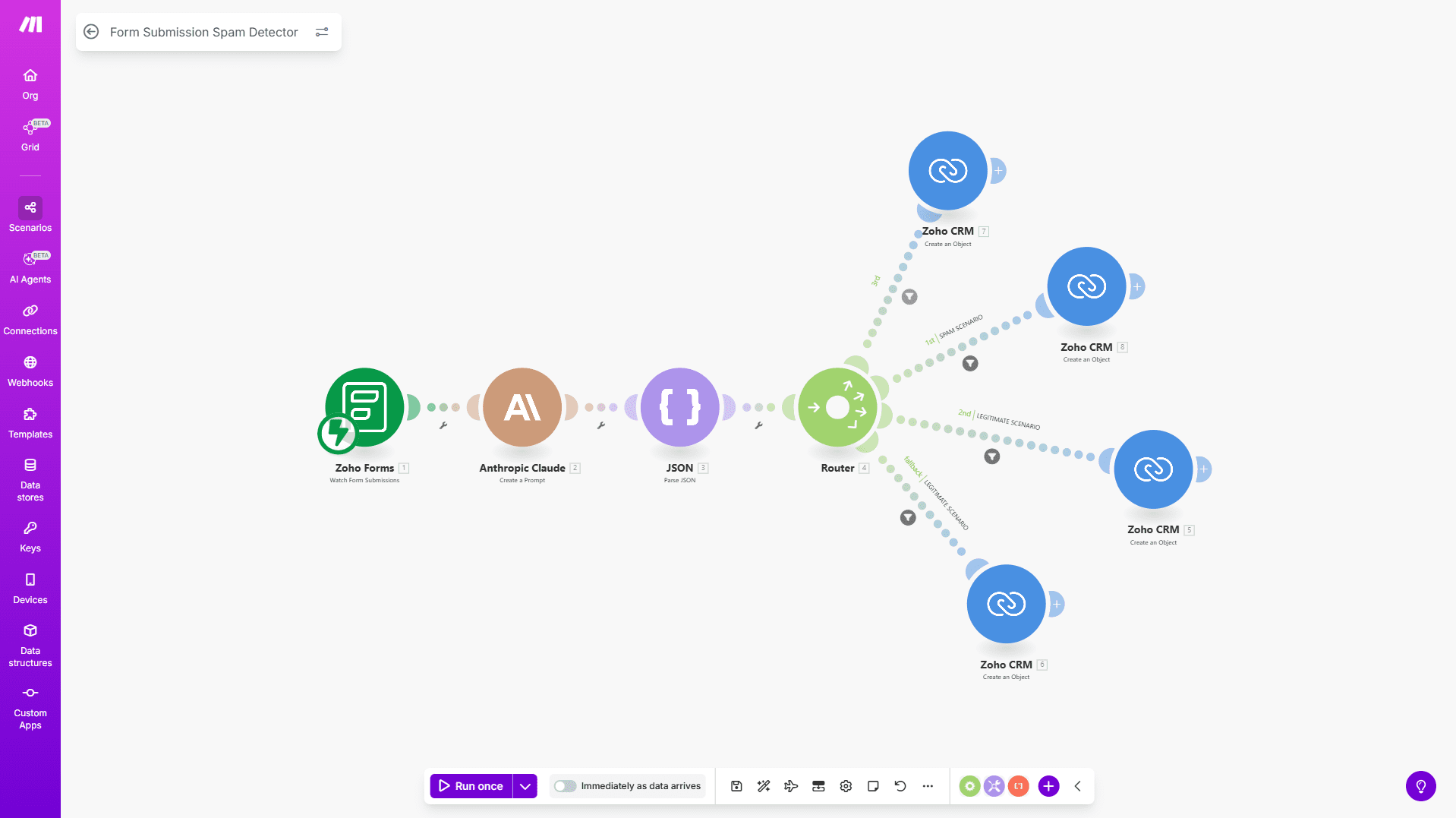
The last piece of the puzzle was the Make.com workflow which included the AI agent. The trigger was easy, the submission of the form data and from here the data was passed straight into the agent. The agent only had one task here and that was to evaluate the data submitted in the form and output a status. The data passed into Zoho would not be processed by the agent as I didn’t want the agent to edit the data. I decided to use Claude as the agent as I felt it’s a little better at determining the outcome of written text as opposed to ChatGPT.
The agent was instructed to look for several signals which included if the honeypot field was filled (a hidden field that bots typically fill in), content relevance to the organisation’s industry, professional language quality, and obvious test patterns. Claude would return one of four classifications: legitimate, spam, test, or uncertain.
After the AI agent I used a router based on the output value. Four workflows mapped the data to the relevant Zoho CRM modules:
Valid submissions created leads in Zoho CRM, continuing through the normal workflow—email verification if needed, or straight through to member matching.
Spam submissions went to the separate spam module, completely isolated. Admins could review if needed but there was no risk of contaminating the main pipeline.
Test submissions created leads tagged as tests, allowing end-to-end testing without triggering member emails. This solved their current problem where testing meant spamming real members.
Uncertain submissions went to the spam module but flagged for human review. These were low-confidence classifications that an admin could manually convert to leads if appropriate.
The workflow worked as intended which was really exciting and I was happy to know I’d developed another practical and useful product as well as achieving my initial aim. It classified submissions correctly, routed them appropriately, and demonstrated that AI could handle the filtering without custom development.
This is the kind of workflow I’m building for Product Scope clients in 2026. My aim is to deliver practical AI applications that solve specific operational problems. This pattern works when form spam has consequences beyond database clutter. If your forms trigger automated communications, create support tickets, or route to people who waste time reviewing junk, AI classification solves a business problem.
The combination of Make.com, Claude, and strategic CRM routing creates a system that’s more intelligent than basic reCAPTCHA whilst remaining manageable without a development team. If you’re facing similar challenges with form submissions, this approach is worth considering.