
Rebuilding Nucleus Around Content: The Story of Media Library
Rebuilding Nucleus Around Content: The Story of Media Library
One of my proudest achievements at BAFTA was developing Media Library for Nucleus. It solved real problems that had been frustrating users for years, but more importantly, it forced me to step back and rethink an entire workflow instead of just patching the broken bits.
It didn’t begin as a grand redesign. It started with something far more basic linking video uploads to entries was not a clear workflow and this confused end users.
When I inherited the old awards system, each entry had space for exactly one video file. If someone submitted the same programme or film to multiple categories, something that happened regularly, they had to upload the same video each time. These weren’t small files either. In 2013, entrants were pushing 4–10GB videos up residential broadband connections that could barely handle it. Every upload had to be watched, ingested, transcoded, and stored completely separately. Every failed upload meant starting again. Every duplicate meant more storage, more processing, more support tickets.
It was painful for entrants and wasteful for BAFTA.
My first attempt at fixing this was Video Management, a separate page where entrants could upload once, then link videos to their entries afterwards. Larger studios liked the logic: one team could handle the entry data, another could manage the files, and everything came together at the end.
But the workflow didn’t match how people actually behaved. Entrants forgot to link videos. Admins chased them constantly. Videos sat in limbo. Films couldn’t be published on the viewing platform because associations were missing. And because this usually happened around December, it made the entire Film Awards cycle harder than it needed to be.
Meanwhile, the Awards team was asking for more media than ever. BAFTA View was on the horizon, which meant we suddenly needed more images, stills, artwork, and multiple video versions. ScreenerHub integrations were creeping into the workflow, adding new video options that only made the UI more confusing. Images could be uploaded inside the entry form. Videos went to a separate management section. ScreenerHub could be referenced via a key. Everything worked, but none of it was coherent.
It was becoming obvious we were fighting the shape of the system. We could keep bolting features onto the existing workflow, or we could redesign the workflow itself.
That’s where Media Library came from.
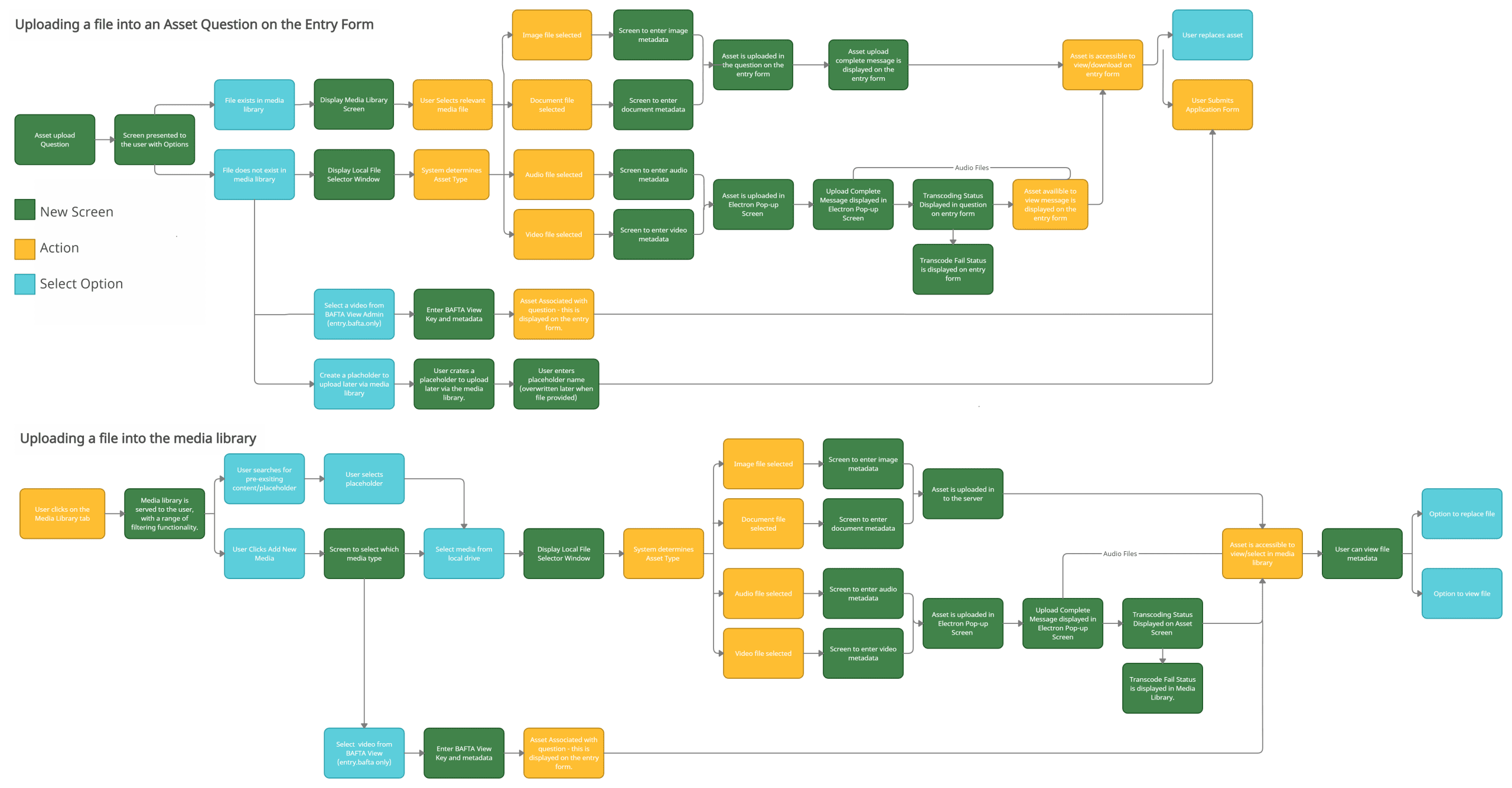
I started by asking a different question. Instead of “how do we attach videos to entries?”, it became “how should Nucleus handle all assets video, audio, images and documents in a way that makes sense for both entrants and admins?”
Rather than uploading media into the form itself, what if everything lived in a central library? What if entrants could upload once, reuse everywhere, and organise their assets in one place? What if the entry form stopped being a corridor of random upload fields and became a clean, consistent experience backed by a proper system?
The inspiration was the media library in a CMS. I’d used WordPress enough to know the model was right, even if the context was wrong. In WordPress, you upload once, preview the file, set metadata, then embed the asset where you need it. It’s intuitive and predictable.
But Nucleus needed all of that to work for thousands of entrants, across different organisations, with complex permissions and admin visibility, and an entirely separate viewing platform built on top. So I took the concept, kept the strengths, and redesigned everything else.
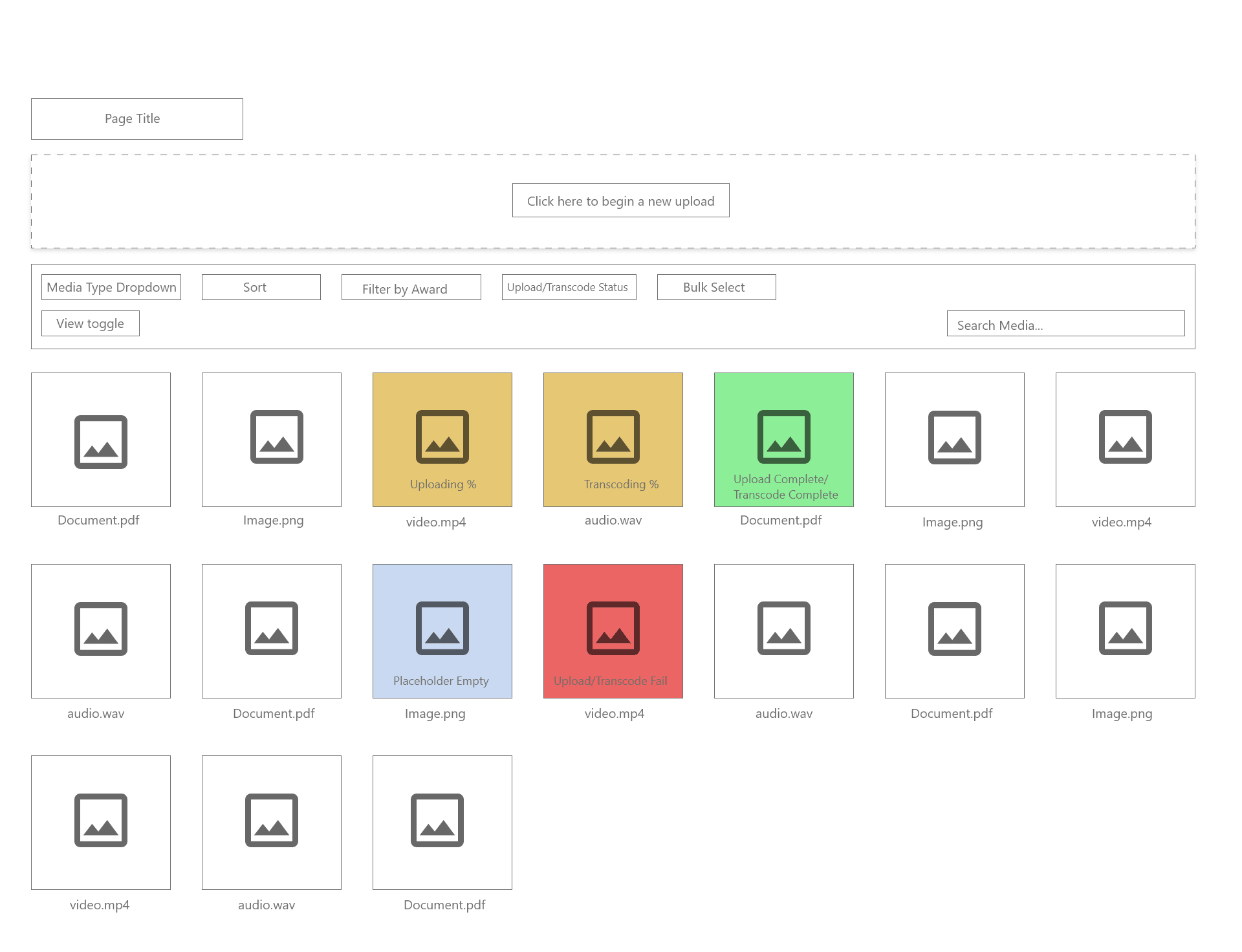
The first change was straightforward, the Video Management workflow had to go. In its place, a proper Media Library, one capable of storing videos, audio, images, and documents. Every media item would have its own page with a preview area and metadata. Every asset would be visible to the entrant who uploaded it and to any other entrant in the same organisation. BAFTA admins would have full search and filtering across all assets. The Awards team could finally see, at a glance, exactly what was linked to each entry.
With the core library in place, I needed to solve the form. The existing upload fields behaved like odd exceptions in the system. To make Media Library work properly, attachments had to behave like any other question.
So I introduced a completely new question type, the Media Library Item question, which allowed entrants to either upload a file or select an existing one from the library. On the admin side, it let people set much more sensible constraints: file type, file size, mandatory vs optional vs placeholder, and where on the form the question should appear. It made the form clearer for entrants and gave admins far more control than they’d ever had
The most difficult part was the Film Awards. They’ve always been the stress-test for Nucleus because they involve late delivery, embargoes, multiple versions, and Christmas deadlines. Studios often want to submit an entry before the final cut is ready. They want the entry on BAFTA View, but they don’t want to be chased for files on Christmas Eve.
The old workflow made everything worse because the system couldn’t represent an intention. The idea that “this will be a video, but it isn’t ready yet.”
So I designed placeholders. A placeholder is a media item with a type (video, audio, image, etc.) but no file yet. It sits inside the Media Library like a real asset. Entrants can link it to an entry and submit the form, and when the file is finally ready, they replace the placeholder and everything updates automatically. BAFTA View doesn’t publish it until the real video is available, but admins don’t need to re-approve anything.
To support this, I added a third state to the Media Item question: allow placeholder. Mandatory, optional, and allow placeholder. If placeholders were allowed, the entrant had to provide either a real file or the placeholder. That one decision eliminated countless follow-up emails every year and prevented submissions that previously would have gone through half-complete.
It also solved a problem we’d run into before: the wrong video ending up linked to an entry. With Media Library, that kind of mistake basically couldn’t happen anymore. Every asset was visible, every status was clear, and the link between entry and media was unambiguous.
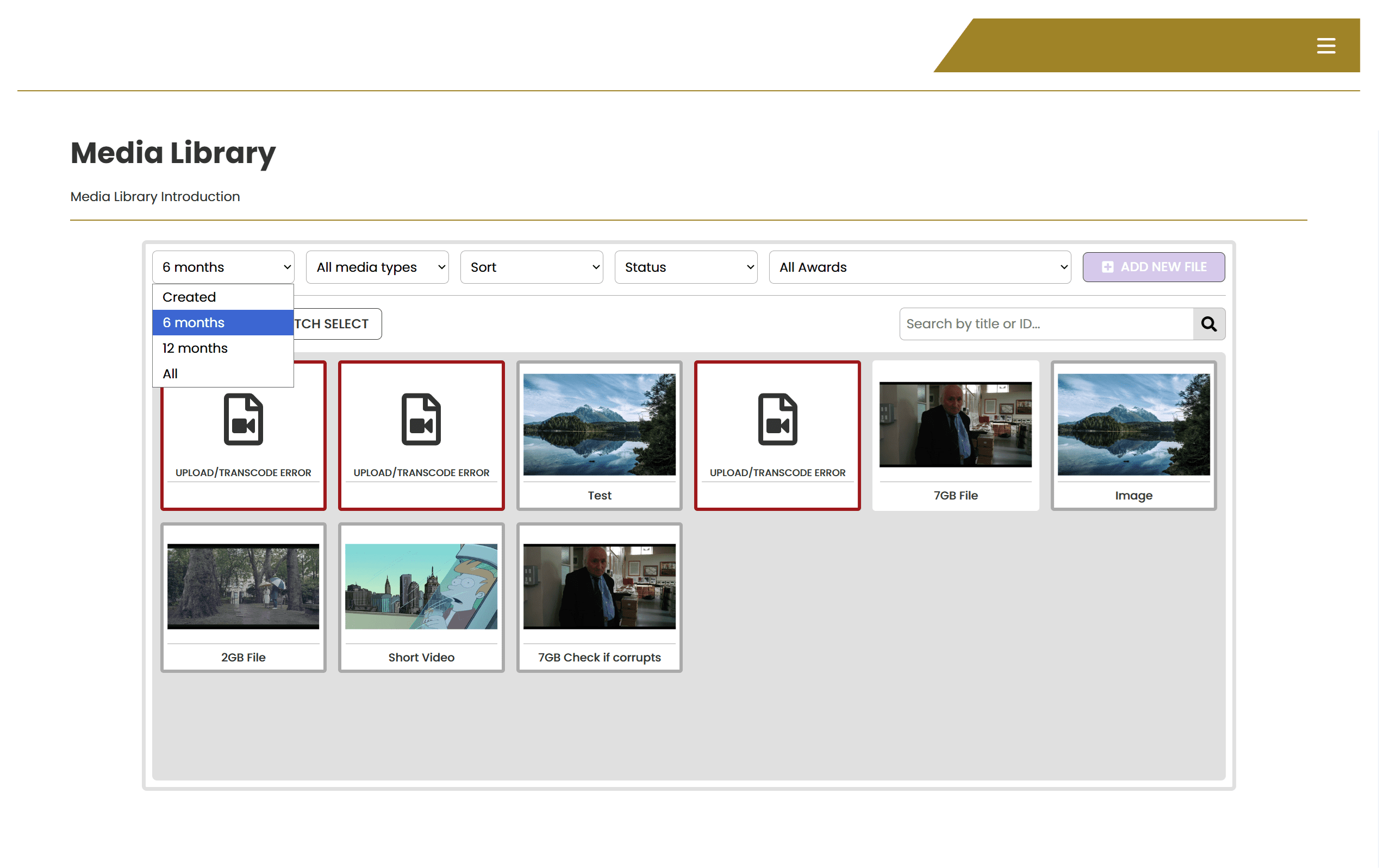
By this point, the project had quietly grown into a genuine rebuild of Nucleus’s entire asset layer. Between scoping, wireframing, front-end builds, backend logic, Electron integration, API development, admin tooling, and viewing platform behaviour, Media Library ended up touching almost every part of Nucleus.
The documentation from the time shows just how many layers there were: dozens of screens, new filters, metadata rules, queue positions for transcoding, error handling states, sharing codes, deletion schedules, BAFTA View integration, and a long list of enhancements that continued for more than a year after launch.
And while all of this was happening, we were also kicking off BAFTA View. The two projects became deeply interconnected because BAFTA View needed the new media model to function. If we built the API around the old Video Management workflow, we’d have had to rebuild it later.
So I made a call which was that the Media Library needed to be delivered first. That meant managing two big projects in parallel, structuring the technical dependencies correctly, and making sure decisions made in one product didn’t break the other.
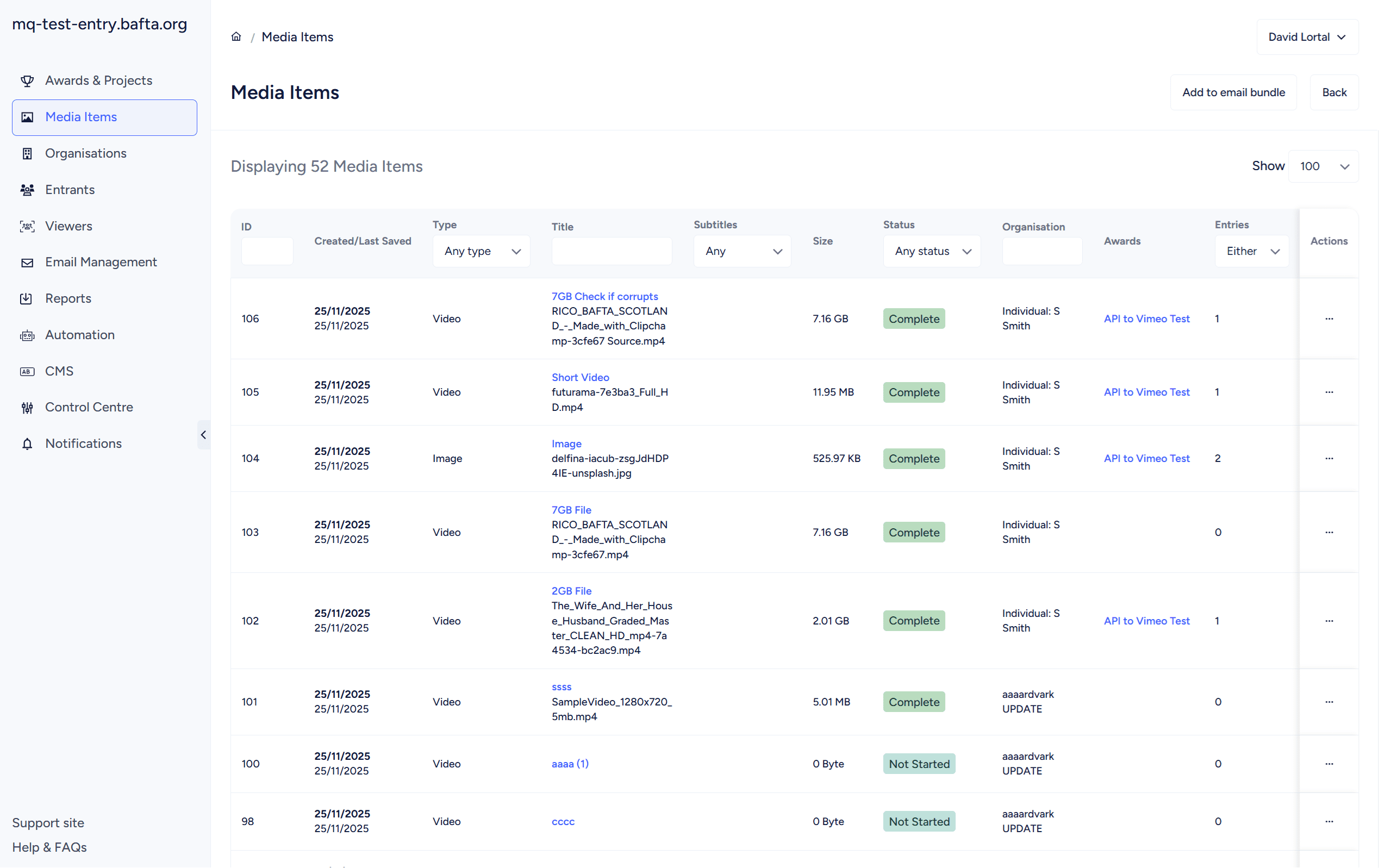
Once the full workflow was mapped out, I presented it to the CTO and the Awards Project Officer. They challenged the logic, we iterated, and eventually we agreed on a version that balanced the needs of entrants, administrators, the Awards team, and the viewing platform.
The engineering work was split between front-end and backend developers, coordinated with support, and reviewed at each milestone. Development ran from May to June 2021, with the launch happening between June and July that year.
The launch went smoothly. There were no celebratory graphs or dramatic KPIs, but the impact was immediate in all the ways that matter:
– Entrants stopped asking why they had to upload the same file multiple times
– Admins stopped chasing people for missing videos
– The system stopped losing time to duplicate transcoding
– The Awards team had reliable access to all the artwork and video they needed
– Support questions dropped
– Mistakes dropped
– The whole submission and viewing pipeline became more resilient
But the real impact came in how the system felt. When a platform becomes calmer, when it starts behaving the way people expect, that’s when you know you’ve solved the right problem.
Media Library didn’t add a single “flashy” feature. It didn’t splash anything across the front end. It didn’t create a brand-new user journey. What it did was fix the foundations. It gave Nucleus a model for handling assets that was consistent, flexible, and predictable, and that made everything built afterwards easier.
Looking back now, Media Library was the moment Nucleus stopped being “a submission form with a video uploader” and became something more sophisticated: a content platform. It handled videos, images, documents, and audio as first-class objects. It linked them consistently. It allowed reuse and sharing. It supported the viewing platform. It created a cleaner mental model across the entire Awards pipeline.
For me personally, it was one of the first big projects where I fully stepped into the role of a product manager rather than simply someone fixing things. It forced me to:
– Challenge assumptions
– Rearchitect the workflow
– Design new UI patterns
– Coordinate across teams
– Deliver something that mattered under genuine time pressure
It also taught me how much difference a well-designed foundation can make to the long-term health of a product. We’re still building on top of Media Library today, and it continues to support features and workflows I couldn’t have anticipated when we first launched it.
It’s still one of the pieces of Nucleus I’m most proud of..